Alesis Melody 61 MKII Music Keyboard Review
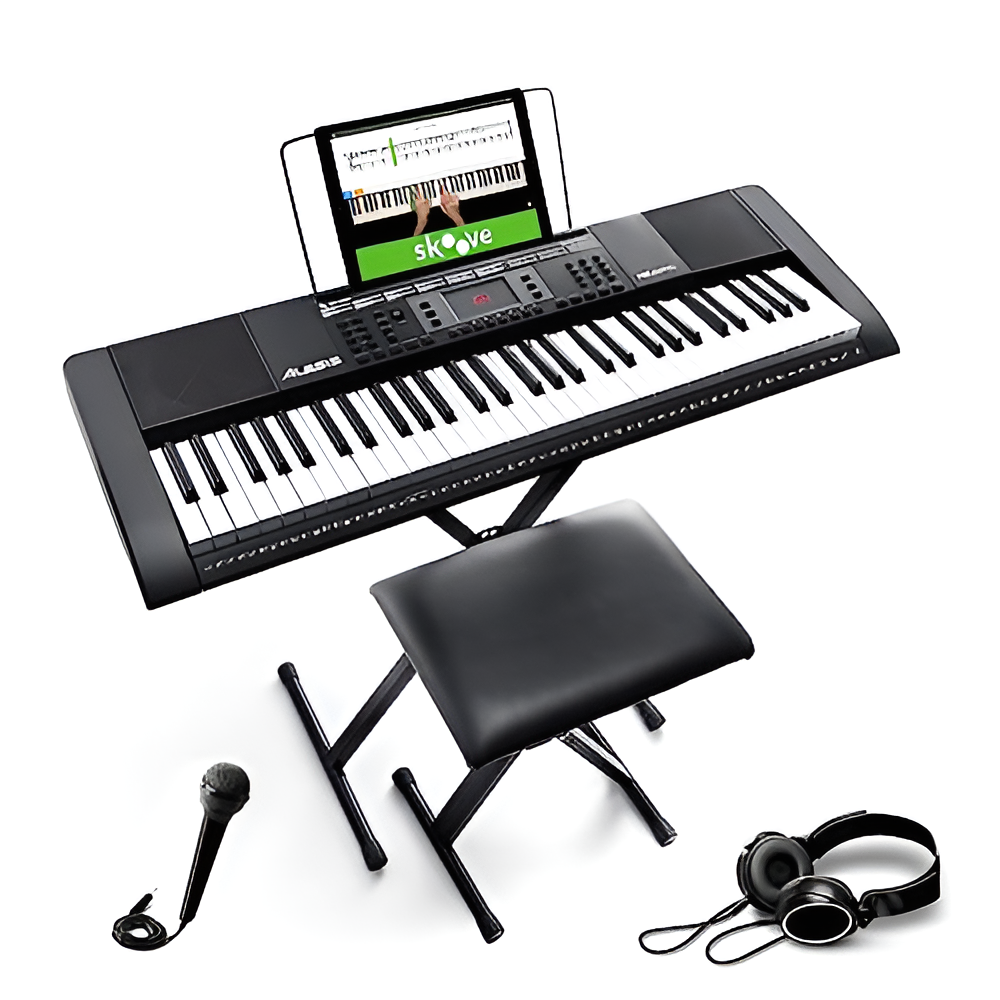
The Alesis Melody 61 MKII is one of the most popular beginner keyboard bundles on Amazon, with over 32,000 reviews. It ships with a stand, bench, headphones, microphone, and a music rest — basically everything a new player needs to start practicing right out of the box.
But popularity alone does not tell you whether this keyboard is right for your situation. After spending time with the Melody 61 MKII, here is what stands out, what disappoints, and who should consider it versus looking elsewhere.
What You Get in the Box
The bundle includes:
- 61 full-size piano-style keys (non-weighted, spring-action)
- Built-in speakers (surprisingly loud, even at low volume settings)
- Keyboard stand with adjustable height
- Bench with two height settings
- Headphones (3.5mm jack, mutes speakers automatically when plugged in)
- Microphone with a 5-foot cable for sing-along
- Music rest that holds sheet music or a tablet
- Power adapter (no battery option)
- 3-month Skoove Premium subscription for interactive piano lessons
- 2-month TakeLessons subscription for live video lessons with real instructors
For a first keyboard, the all-in-one packaging removes the friction of figuring out which accessories to buy separately. The stand and bench alone would cost a fair amount if purchased on their own. You can check the current price on Amazon.
Sound and Voice Selection
The Melody 61 MKII comes loaded with 300 voices spanning acoustic piano, electric piano, strings, organ, synth, brass, woodwinds, percussion, guitars, and sound effects. There are also 300 built-in rhythms and 40 demo songs.
The acoustic piano voice is decent for a keyboard at this level — it will not fool anyone into thinking they are hearing a real grand piano, but it is clear enough for learning proper fingering and basic repertoire. The organ and string voices are fun for experimenting, though many of the 300 tones overlap in quality and usefulness.
Dual mode lets you layer two voices together (piano plus strings, for example), while Split mode divides the keyboard so your left hand plays one voice and your right hand plays another. These are genuinely useful features for beginners learning to coordinate both hands independently.
The Record function captures your performance so you can play it back and hear mistakes you might miss in real time. This is an underrated practice tool, especially for self-taught players without a teacher providing feedback.
Key Feel and Action — Be Honest About What This Is
This is the section where the Melody 61 MKII gets misunderstood the most. The marketing describes the keys as “piano-style,” and they are full-size, which is true. But these are not weighted keys and they are not velocity-sensitive.
That means no matter how hard or soft you press a key, the sound comes out at the same volume. On a real piano or a higher-end digital piano, pressing harder produces a louder sound. This lack of touch response is the single biggest limitation of the Melody 61 MKII. If you are learning classical piano or want to develop proper dynamics, you will eventually outgrow this keyboard.
For young children or casual hobbyists exploring whether they even enjoy playing, the lighter spring-action keys are actually easier to press, which can be a plus in the early weeks of learning. If you are looking for keyboards specifically suited to younger players, check out our guide on the best keyboards for kids.
Built-In Learning Tools
The Skoove Premium subscription (3 months free) is a genuine standout. Skoove listens through your computer or tablet microphone and gives real-time feedback as you play along with guided lessons. It covers everything from total beginner basics to intermediate songs. The 2-month TakeLessons subscription adds live video classes with actual teachers, which helps if you want interactive instruction.
The 40 demo songs provide play-along material, and the One-Key Song mode walks you through melodies one note at a time — press any key and it advances to the next correct note. This is a good confidence-builder for absolute beginners, but do not rely on it too long. It teaches song memory without developing actual reading or finger placement skills.
What the Melody 61 MKII Lacks
Being direct about the limitations helps you decide if this keyboard fits your goals:
No sustain pedal input
There is no jack for a sustain pedal. Instead, the Melody 61 MKII has a sustain button on the control panel. This works, but it is nowhere near as musical or responsive as a foot pedal. If sustain matters to the music you want to play, this is a real drawback.
No USB MIDI output
You cannot connect this keyboard to a computer as a MIDI controller. If you have any interest in music production, recording into a DAW, or using virtual instruments, you will need a keyboard with USB MIDI. The Alesis Melody 32 (their smaller model) actually includes USB MIDI, but the 61 MKII does not.
No touch sensitivity
As covered above, there is no velocity response. Every note plays at the same volume regardless of how you strike the key. The Royal Conservatory of Music and most piano teachers will tell you that dynamics are fundamental to musical expression, so this limits how far you can develop on this instrument alone.
No battery power
The keyboard runs on AC power only. You cannot take it to a park or play it somewhere without an outlet. For a portable keyboard, this is a surprising omission.
Build Quality and Durability
The keyboard itself is lightweight at roughly 3 kilograms (about 6.6 pounds), which makes it easy to move around but also means it does not feel particularly substantial. The plastic housing is standard for this category.
The included stand and bench are functional but basic. Some users report the bench feeling wobbly for heavier adults. The headphones are entry-level quality — they work for practice but you may want to use your own pair for better sound.
Amazon review data shows that the majority of buyers rate build quality positively, but a subset report durability issues including keys sticking or the keyboard failing after a few months. This is not unusual for budget keyboards, and Alesis does offer support through their Amazon team at amzsupport@alesis.com.
Who Should Buy the Alesis Melody 61 MKII
This keyboard makes the most sense for:
- Young children (ages 5-12) exploring piano for the first time
- Complete beginners who want an affordable way to find out if they enjoy playing before investing more
- Casual hobbyists who want to play simple songs without pursuing serious technique
- Gift buyers looking for a complete package that does not require additional purchases
If any of these describe your situation, the Melody 61 MKII delivers solid value. The included accessories genuinely save you money compared to buying a keyboard and stand and bench separately.
Who Should Look Elsewhere
You should skip this keyboard if:
- You want to learn classical piano properly — the lack of weighted keys and velocity sensitivity will hold you back. Consider a keyboard with at least semi-weighted or hammer-action keys.
- You want to connect to a computer for recording — no USB MIDI means no DAW integration.
- You are an adult beginner who is serious about progressing — you will outgrow this keyboard within 6-12 months. Spending more upfront on a keyboard with touch response saves you from buying twice.
- You want lighted keys for guided learning — the Melody 61 MKII does not have light-up keys. See our roundup of lighted keyboard pianos if that feature matters to you.
Melody 61 MKII vs. MK4: The Newer Model
Alesis has released the Melody 61 MK4 as the successor to the MKII. The MK4 updates the bundle with a refreshed design and maintains the same core feature set (61 keys, 300 voices, 300 rhythms, stand and bench included). If you are buying new, check whether the MK4 is available at a similar price — it may be worth getting the newer version.
That said, if you find the MKII at a lower price point (which is common since it is the older model), it remains a perfectly functional beginner keyboard. The differences between the two generations are not dramatic enough to pay significantly more for the MK4.
How It Compares to Other Budget Keyboards
The Melody 61 MKII competes primarily with the RockJam 61 and Donner DEK-610 in the beginner bundle category. All three offer similar voice counts and built-in rhythms. The main differentiator for the Alesis is the included bench and stand — most competitors at this range make you buy those separately.
For a broader comparison, our best arranger keyboard guide covers options across multiple price tiers, including models with features the Melody 61 MKII lacks (weighted keys, MIDI, sustain pedal jacks).
Final Verdict
The Alesis Melody 61 MKII does exactly what it promises: it gives beginners a complete, ready-to-play keyboard package with enough sounds and features to keep things interesting in the first months of learning. The Skoove and TakeLessons subscriptions add real educational value that you would otherwise pay for separately.
Its limitations — no weighted keys, no velocity sensitivity, no sustain pedal jack, no USB MIDI — are real and worth understanding before you buy. These are not flaws; they are trade-offs inherent to a keyboard at this level. If you accept those trade-offs and fit the target audience described above, the Melody 61 MKII is a smart first purchase.
If you want something you will not outgrow as quickly, you will need to spend more and potentially buy accessories separately. That is always the calculus with beginner bundles — convenience and low entry cost now versus longer-term capability.