5 Best Equalizer Pedals for Bass Guitar in 2025
An EQ pedal might be the least glamorous thing on your pedalboard, but it is arguably the most useful. While distortion and overdrive get all the attention, a good equalizer does the foundational work: it shapes your tone to fit the room, the mix, and the song. Many working bass players run an EQ pedal as their always-on secret weapon.
Below are five EQ pedals worth considering, followed by a practical guide on how to actually use one.
The 5 Best Bass EQ Pedals
1. Boss GEB-7 — Best Dedicated Bass EQ
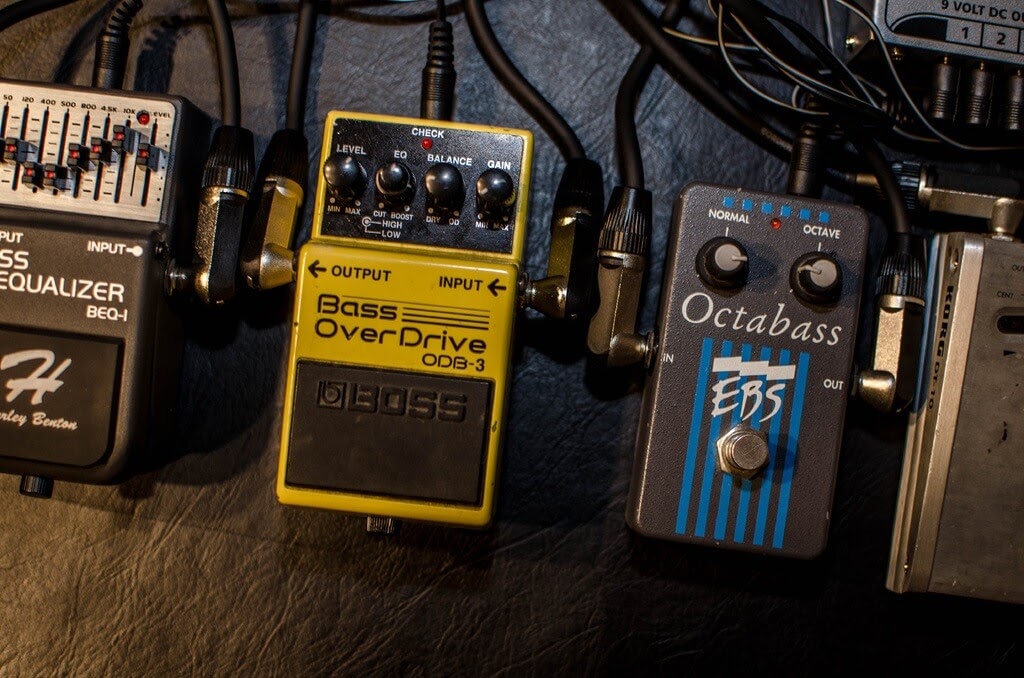
The Boss GEB-7 is the industry standard for bass EQ pedals, and for good reason. Unlike Boss’s guitar-focused GE-7, the GEB-7 was designed specifically for bass, with its seven frequency bands tuned to the instrument’s range: 50Hz, 120Hz, 400Hz, 500Hz, 800Hz, 4.5kHz, and 10kHz.
Five of those seven bands sit below 1kHz, which is exactly where bass lives. That means you get surgical control over the frequencies that matter most — tightening the sub-bass, adding punch in the low-mids, or scooping the mids for a slap tone.
Why it works: The master volume slider is a standout feature, offering up to +/-15dB of boost or cut. You can use it as a clean boost for solos without changing your EQ shape at all. The Boss enclosure is also essentially indestructible — there are GEB-7 units from the early 2000s still doing nightly gigs.
Watch out for: The sliders can shift inside a pedalboard bag during transport. Take a photo of your settings as backup. Also, the 4.5kHz jump from 800Hz is a big gap — you lose some control over the 1-3kHz range where upper-mid “growl” lives.
Specs: 7-band graphic EQ | +/-15dB per band | 9V battery or adapter | Boss compact enclosure
2. MXR M108S Ten Band EQ — Best Overall Flexibility
The MXR M108S is not bass-specific, but its 10-band layout covers 31.25Hz all the way up to 16kHz, giving you more frequency points than any bass-dedicated pedal. Running on 18V (via the included power supply), it has noticeably more headroom than 9V units, which means less noise and more clean boost available.
The dual outputs let you run two separate signal chains — useful if you split between a bass amp and a DI to front-of-house, each with its own EQ curve. True bypass keeps your signal clean when the pedal is off.
Why it works: The 10 bands give you fine-grained control across the entire spectrum. The 250Hz and 500Hz sliders are particularly useful for bass — that’s where mud accumulates and where you can add body. The noise-reduction circuitry keeps things quiet even with aggressive boosts.
Watch out for: It is a large pedal that takes up significant pedalboard real estate. The 18V power requirement means you need the included adapter or a multi-output supply that can deliver 18V — a standard 9V daisy chain will not work.
Specs: 10-band graphic EQ | +/-12dB per band | 18V DC power supply included | True bypass | Dual outputs
3. Source Audio EQ2 — Best Programmable EQ
The Source Audio EQ2 is in a different league. This is a fully parametric digital EQ with a built-in display, four saveable presets, stereo I/O, and MIDI control. You get up to eight parametric bands, and you can set the exact center frequency, gain, and Q width for each one.
That flexibility solves the biggest limitation of graphic EQs: fixed frequency centers. If your problem frequency is at 700Hz, a graphic EQ with bands at 500Hz and 800Hz forces you to compromise. The EQ2 lets you target 700Hz precisely, with as narrow or wide a Q as you need.
Why it works: Four onboard presets mean you can save a different EQ curve for each bass you own, or for different venues. The Neuro app gives you even deeper editing on a phone or computer. Stereo outputs let you send different EQ curves to different amps or a biamped rig. MIDI integration makes it ideal for programmable pedalboard setups.
Watch out for: The learning curve is real. This is not a plug-and-play pedal — expect to spend time with the manual and the app. The price point is also significantly higher than a GEB-7 or MXR.
Specs: Up to 8-band parametric EQ | 4 presets | Stereo I/O | MIDI | Neuro app compatible | 9V DC
4. Empress Effects ParaEQ — Best Parametric for Bass
The Empress Effects ParaEQ takes a different approach: three fully parametric bands (low, mid, high), each with frequency, gain, and bandwidth controls, plus hi-pass and lo-pass filters and a 30dB boost.
Internally, it runs at 27V, which gives it exceptional headroom. The pedal is dead quiet and completely transparent — it shapes your tone without adding any color of its own. The hi-pass filter alone is worth the price of admission for live players: set it to roll off below 80Hz and you instantly eliminate the mud and rumble that plagues many bass rigs in small venues.
Why it works: The combination of parametric EQ and filters gives you studio-grade tone sculpting in a pedal. It auto-detects balanced/unbalanced connections and compensates for signal loss on long cable runs. The Hi-Z input accommodates piezo-equipped acoustic bass guitars and upright basses.
Watch out for: No preset storage — you set it and leave it. The knob layout takes some getting used to if you are coming from graphic EQs. It is also one of the pricier options.
Specs: 3-band fully parametric EQ | Hi-pass & lo-pass filters | 30dB boost | 27V internal | Hi-Z input | 9V DC
5. Whirlwind Bass Ten — Best 10-Band for Touring
The Whirlwind Bass Ten is a 10-band graphic EQ designed by Tony Gambacurta, a former senior engineer at MXR. The frequency bands are tuned specifically for bass: 31Hz, 62Hz, 125Hz, 250Hz, 500Hz, 1kHz, 2kHz, 4kHz, 8kHz, and 16kHz.
What sets it apart is the Constant-Q design. On most graphic EQs, boosting one frequency bleeds into neighboring bands. The Bass Ten keeps each band isolated, so your adjustments are precise and predictable — more like a studio parametric than a typical graphic pedal.
Why it works: Made in the USA with a heavy-duty steel enclosure built for touring. The +/-15dB range per band plus overall volume control gives you enough gain to use it as a boost pedal. The bass-optimized frequency centers mean every slider is actually useful for your instrument.
Watch out for: It is physically large. The price point is mid-range but higher than the Boss. No presets or digital features.
Specs: 10-band graphic EQ | Constant-Q design | +/-15dB per band | Volume control | Made in USA | 9V DC
Graphic vs Parametric EQ: Which Do You Need?
This is the most important decision when choosing a bass EQ pedal, so it is worth understanding the difference.
Graphic EQ
A graphic EQ (like the Boss GEB-7, MXR M108S, or Whirlwind Bass Ten) has a set of sliders at fixed frequency points. You push a slider up to boost that frequency, or pull it down to cut. What you see is literally what you get — the slider positions form a visual “graph” of your EQ curve.
Best for: Quick adjustments on the fly, visual feedback during a gig, straightforward tone shaping. If you want to scoop the mids or add some low-end thump, a graphic EQ gets you there in seconds.
Limitation: The frequency centers are fixed. If your problem frequency sits between two sliders, you can only approximate the correction.
Parametric EQ
A parametric EQ (like the Source Audio EQ2 or Empress ParaEQ) lets you choose the center frequency, the amount of boost/cut, and the bandwidth (Q) of each band. This gives you precise, surgical control.
Best for: Targeting specific problem frequencies, adapting to different rooms and backlines, studio-quality tone sculpting. Parametric EQs are what sound engineers use in recording studios and on mixing boards for a reason.
Limitation: More complex to operate. There is no visual “graph” to glance at — you need to know what you are listening for.
For most bass players, a graphic EQ is the practical choice. If you find yourself constantly fighting the same tonal issues across different venues and want more precision, step up to a parametric.
Where to Put an EQ Pedal in Your Signal Chain
Signal chain placement changes what an EQ pedal does to your sound.
Before other effects (near the front): The EQ shapes your raw bass tone before it hits compression, overdrive, or chorus. Cutting low-end mud here prevents it from being amplified by everything downstream. This is the most common placement for “always-on” tone shaping.
In the effects loop: If your amp has an effects loop, placing the EQ there lets you shape the tone after the preamp stage. This is where it has the most dramatic impact on your overall sound — you are EQing the amp’s tone, not just the bass guitar’s signal.
At the end of the chain (before the amp): Useful as a final tone-correction step, or as a clean boost. If you use the EQ pedal only for solos or specific sections, this placement lets you lift the overall volume and tweak the tone without affecting your other pedals.
Going direct: If you play direct into a PA or audio interface, an EQ pedal before your DI box acts as your “amp tone.” A bass preamp pedal combined with an EQ is a powerful rig-in-a-box for fly dates and session work.
How to EQ a Bass Guitar: Practical Starting Points
Rather than chasing a “best EQ setting” (there is no such thing), it helps to understand what each frequency range does to a bass tone.
Frequency Guide for Bass Guitar
- 30-60Hz (Sub-bass): The physical rumble you feel more than hear. A little goes a long way. Too much and you will overwhelm a mix and eat up headroom. Cut here to tighten up your low end.
- 60-120Hz (Low bass): The fundamental tone of your lowest notes. This is where the “weight” of the bass lives. Boost moderately for a fatter tone, cut to reduce boominess.
- 120-250Hz (Upper bass): Warmth and body. This range can get muddy fast, especially in small rooms with poor acoustics. A slight cut here often cleans up your sound more than any boost elsewhere.
- 250-500Hz (Low mids): Punch and body. The low-mid range is where bass “sits” in a band mix. Boosting here helps you cut through guitars and keyboards without turning up.
- 500Hz-1kHz (Mids): Attack and growl. Scooping this range gives a “modern” tone (think slap bass), but too much scoop makes you disappear in a live band context.
- 1-4kHz (Upper mids): String articulation and finger noise. Boost for clarity and note definition, especially in dense mixes. Cut if the tone is harsh or clanky.
- 4-10kHz (Presence/treble): Air and sparkle. Useful for roundwound string brightness. Most bass-relevant content lives below 5kHz, so this range matters less than on guitar.
The Subtractive EQ Approach
Here is a tip that changed how many professional bassists approach EQ: instead of asking “what do I want more of?”, ask “what do I want less of?”
Start with all sliders at center (flat). Play through the full range of your bass and listen for what bothers you. Boomy? Cut around 100-200Hz. Muddy? Cut 200-400Hz. Harsh? Cut 2-4kHz. This subtractive approach produces cleaner, more natural results than boosting everything you think you want more of.
Boosting adds energy and can introduce noise and distortion. Cutting removes problems without adding anything artificial. Once you have subtracted the bad stuff, you may find you do not need to boost at all.
Live vs Studio: Different EQ Strategies
Live Use
Live is where a bass EQ pedal earns its keep. Every room sounds different. The EQ that works perfectly at rehearsal may sound terrible on stage. An always-on EQ pedal lets you adapt in seconds.
Common live scenarios:
- Boomy stage: Cut 80-200Hz to tighten the low end.
- Lost in the mix: Boost 250-500Hz for more presence, or boost 800Hz-1kHz for more attack.
- Harsh DI tone: Cut 2-4kHz to smooth out the direct signal going to front-of-house.
- Solo boost: Use the volume/gain slider to push 3-6dB of clean boost without changing your EQ shape.
Studio Use
In a recording context, an EQ pedal before your DI or audio interface lets you print a better tone to begin with, reducing the amount of corrective EQ needed in the mix.
Practical studio uses:
- Remove low-end rumble: Use a hi-pass filter (or cut below 40Hz) to keep sub-bass out of the recording. Your mix engineer will thank you.
- Tame resonant frequencies: Every bass has a note or two that “boom” more than others. A narrow cut at that frequency evens out your dynamics.
- Shape DI tone: If you are recording direct without an amp, an EQ pedal adds the tonal character that an amp would normally provide.
Frequently Asked Questions
Do I need a bass-specific EQ pedal?
Not necessarily. A general EQ pedal like the MXR M108S works fine for bass as long as its frequency bands extend low enough (below 100Hz). Bass-specific pedals like the Boss GEB-7 have the advantage of frequency centers tuned to where bass guitar actually lives, so every slider is immediately useful.
Where should I put the EQ pedal on my pedalboard?
For most players, early in the chain (after your tuner) works best as an always-on tone-shaping tool. If you use it as a solo boost, put it near the end. Experiment with both positions — the “right” answer depends on what you want the EQ to do.
Can I use an EQ pedal instead of a preamp?
An EQ pedal shapes frequencies but does not add the gain staging, impedance matching, or tonal coloring that a dedicated preamp pedal provides. That said, a good EQ pedal before a clean DI gets you surprisingly close to a shaped amp tone for direct gigs.
Is a 10-band EQ overkill for bass?
For most live situations, a 7-band pedal like the Boss GEB-7 covers everything you need. A 10-band gives you more precision in the mids and highs, which is useful if you play multiple basses with different tonal characters or if you do a lot of studio work. More bands is not inherently better — it just means more decisions to make.