Korg Volca Beats Analog Drum Machine Review
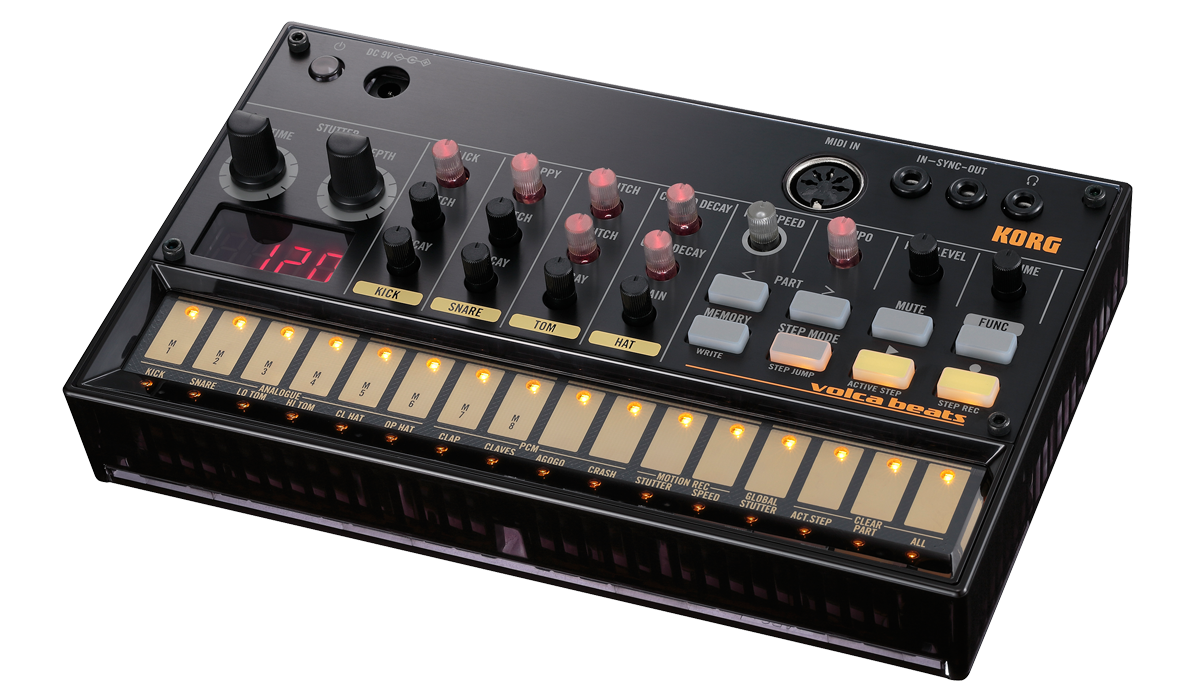
The Korg Volca Beats is a pocket-sized analog drum machine with a 16-step sequencer, six analog voices, four PCM sounds, and sync I/O for chaining with other gear. It weighs 377 grams, runs on six AA batteries for roughly 10 hours, and outputs mono audio through a 3.5mm headphone jack.
That spec sheet undersells how much fun this thing actually is. The Volca Beats draws from the same lineage as Korg’s Electribe series, but strips everything down to a single-purpose instrument you can throw in a backpack and start programming beats on a park bench. If you are looking for your first hardware drum machine, this is one of the most approachable entry points available.
Check the current price on Amazon
Sound: Voice by Voice
The Volca Beats is a hybrid. Its kick, snare, hi-hat (open and closed), and two toms are generated by analog circuits. The clap, claves, agogo, and crash cymbal are PCM samples. This mix gives you the warmth of analog synthesis where it matters most while filling out the kit with digital percussion.
Kick
The kick is the standout. At high pitch settings with a short decay, you get a tight, punchy thump. Drop the pitch and extend the decay and it descends into deep 808-style sub territory that has no business coming out of a device this small. The Click knob adds a transient attack that helps the kick cut through a mix. This single voice alone justifies the purchase for a lot of electronic producers.
Snare
The snare is the weakest analog voice. It leans chirpy and thin by default, and the Snappy knob controls the amount of white noise in the sound rather than giving you the gritty crack most people want from an analog snare. That said, with the decay set very short and Snappy turned down, you can coax a decent rimshot out of it. Layering the analog snare with the PCM clap goes a long way toward filling out the frequency range.
Hi-Hats
The open and closed hi-hats share a Grain knob that adjusts the pitch and tonal character of the noise component. Each hat gets its own decay control. The hats cut through consistently and the Grain parameter gives them a gritty, metallic edge that sits well in techno and house patterns. These are among the best-sounding hi-hats you will find at this price point.
Toms
The high and low toms share a single decay control and each has its own tuning. They are simple analog thumps, but they are useful beyond their intended role. Tune the low tom down and you can use it as a secondary bass element. Run them through an external distortion pedal and they get nasty in a good way.
PCM Voices
The four PCM sounds (clap, claves, agogo, crash) share a Speed knob that adjusts sample playback rate. The clever part is that the pitch setting is stored independently per voice, so you can pitch the clap down while keeping the crash at normal speed. The clap is the most useful of the four and pairs well with the analog snare. The agogo becomes a strange struck-bottle sound at high speeds, and the crash turns into a lo-fi gong at low speeds. These are not just filler sounds — experimenting with the Speed knob unlocks textures you would not expect from stock PCM samples.
The Sequencer
The 16-step sequencer is where the Volca Beats earns its keep. You get three ways to program patterns:
Step mode (X0X-style): Select a drum part, then tap the step buttons to place hits. This is the classic Roland TR approach and the fastest way to build a basic pattern.
Step record mode: The sequencer advances one step at a time, and you activate whichever drums should play on that step. This works well when you already have a specific groove mapped out in your head.
Real-time recording: Hit Record and tap the ribbon keys as the pattern plays. Mistakes are easy to fix — slip into Step Mode without stopping playback and remove any bad hits.
The sequencer stores eight patterns, and switching between them happens on the next step rather than at the end of the current pattern. This means you can chain pattern changes mid-bar for composite grooves during a live set.
Active Step and Step Jump
Active Step lets you deactivate specific steps from the entire pattern, effectively shortening the loop on the fly. You can take a 16-step pattern and reduce it to 5, 7, or any odd length, which instantly creates polyrhythmic tension against other gear running standard 16-step loops.
Step Jump lets you pick a specific step to jump to during playback. Combined with Active Step, these two features turn the sequencer into a genuine performance tool rather than just a loop player.
What the Sequencer Lacks
There is no accent or velocity control when programming steps — every hit plays at the same level. There is no pattern chaining either, so you cannot string patterns together into a longer arrangement without switching them manually. If you need those features, look at the Arturia DrumBrute Impact or step up to a more full-featured drum machine.
The Stutter Effect
The Stutter function is unique to the Volca Beats and worth calling out separately. It works like a beat-repeat or ratcheting effect, retriggering sounds at a rate controlled by the Stutter Depth and Speed knobs.
You can apply Stutter globally (to the entire drum mix) or to individual voices. Setting it to a single hi-hat and sweeping the speed creates rapid rolls that approximate flams and ghost notes — something the sequencer itself cannot do. At slow speeds, it becomes a gritty glitch effect.
Both Stutter knobs can be recorded into patterns via motion sequencing, so your fills and glitch moments play back exactly as you programmed them. This is one of the features that separates the Volca Beats from other budget drum machines.
Connectivity and Integration
Sync I/O
The Volca Beats has 3.5mm Sync In and Sync Out jacks that let you daisy-chain it with other Volca units (Keys, Bass, Kick, FM, Sample, etc.) or any gear that accepts 5V analog clock pulses. Korg includes a sync cable in the box. The sync voltage can be inverted in the global settings for compatibility with S-trig sequencers.
If you already own other Volcas, the Beats slots in immediately. Sync one Volca to the next in series, hit play on the first unit, and they all lock together. It is the simplest multi-device sync you will find in hardware.
MIDI In
The MIDI IN port (standard 5-pin DIN) lets you trigger the Volca Beats from a DAW, MIDI controller, or drum pad. The sequencer also syncs to incoming MIDI clock, so you can slave it to your DAW’s tempo without using the analog sync jacks.
There is no MIDI Out, which is the single most common complaint from users. You cannot record the Volca’s internal sequencer data back into a DAW via MIDI. The workaround is to record the audio output directly, which works fine for most workflows but limits integration if you want to capture your patterns as MIDI data.
Audio Output
Output is mono through a single 3.5mm headphone jack. Plugging in a cable disables the built-in speaker. There are no individual outputs for separate voices — everything comes out as a summed mono signal. If you need per-voice processing, the best approach is to record each sound one at a time by muting everything else, then align the samples in your DAW.
The Built-In Speaker
The internal speaker is useful for sketching ideas when you do not have headphones handy, but it is too quiet and too thin for anything beyond that. Treat it as a convenience feature for on-the-go programming, not a monitoring solution. Any external speaker, headphones, or mixer connection will sound dramatically better.
Practical Tips
Power supply: The Volca Beats does not ship with an AC adapter (unless you buy a bundle). It runs on six AA batteries or an optional 9V DC adapter (center-positive). If you plan to use it in a studio setting, pick up a Korg KA-350 adapter or a compatible third-party power supply to avoid burning through batteries.
Volume balancing: The analog voices and PCM voices can sit at noticeably different volume levels. There is a single Level knob that adjusts the selected voice’s volume, but dialing in a balanced mix across all 10 sounds takes patience. Write down your level settings if you find a mix you like — switching patterns does not always preserve them the way you expect.
Recording into a DAW: Since the output is mono 3.5mm, use a 3.5mm-to-1/4” adapter (or a 3.5mm-to-dual-RCA cable) to connect to your audio interface. Record each voice separately by muting everything else if you want to process sounds individually. This is tedious but gives you far more control than recording the full mix.
External effects: The Volca Beats responds well to external processing. Running it through a reverb pedal, delay, or distortion opens up the sound palette significantly. The toms and kick in particular sound massive through even a cheap overdrive pedal.
Who Should Buy the Volca Beats
The Volca Beats makes the most sense for three groups:
Beginners learning hardware sequencing. If you have never programmed a beat on a physical step sequencer, the Volca Beats teaches you the fundamentals without overwhelming you. The 16-step workflow, analog sound shaping, and hands-on knobs build skills that transfer directly to more advanced machines. For a broader look at getting started with hardware beat-making, check out our beginner MPC guide.
Electronic producers who want an analog sound source. Even if you primarily work in a DAW, having a hardware analog drum machine adds a character that plugins struggle to replicate. The Volca Beats works well as a dedicated kick and hi-hat generator feeding into your audio interface.
Live performers building a portable rig. The battery life, tiny footprint, and sync I/O make the Volca Beats a natural fit for tabletop setups. Chain it with a Volca Bass and a Volca Keys and you have a complete live electronic set that fits in a messenger bag.
Who Should Skip It
If you need realistic acoustic drum sounds, velocity-sensitive pads, or individual audio outputs, the Volca Beats is not the right tool. Producers who want a self-contained beat-making workflow with sampling, arrangement, and pad control should look at an MPC or a more full-featured drum pad controller instead.
The snare sound is a genuine weak point. If snare character is critical to your music, you will likely want to process the Volca Beats’ snare externally or replace it with a sample in your DAW.
Alternatives Worth Considering
IK Multimedia UNO Drum: Expands on the Volca Beats formula with six analog voices, 12 PCM voices, a 64-step sequencer, and both USB and MIDI I/O. It costs more but fills more gaps. Check it on Amazon
Teenage Engineering PO-12: Even smaller and cheaper than the Volca Beats. It gives you 16 drum sounds, 16 effects, and a 16-step sequencer in a calculator-sized form factor. The trade-off is build quality and sound depth. Check it on Amazon
Arturia DrumBrute Impact: Steps up to 10 analog voices, a 64-step sequencer with polyrhythm support, individual audio outputs, and a per-voice distortion circuit. If you are willing to spend more for a more complete instrument, the DrumBrute Impact is the next logical jump. Check it on Amazon
For a full rundown of options across every price range, see our best drum machines guide.
Final Verdict
The Korg Volca Beats is not a do-everything drum machine. It has a weak snare, mono output, no velocity, no MIDI out, and only eight pattern slots. But what it does well — fat analog kicks, gritty hi-hats, an intuitive step sequencer, a genuinely useful stutter effect, and dead-simple sync with other gear — it does at a price that makes it almost an impulse purchase.
It has remained in Korg’s lineup for over a decade because nothing else occupies its exact niche: a real analog drum machine small enough to fit in your coat pocket. For learning hardware beat-making, adding analog texture to a DAW setup, or building a portable live rig, the Volca Beats is still a smart buy.