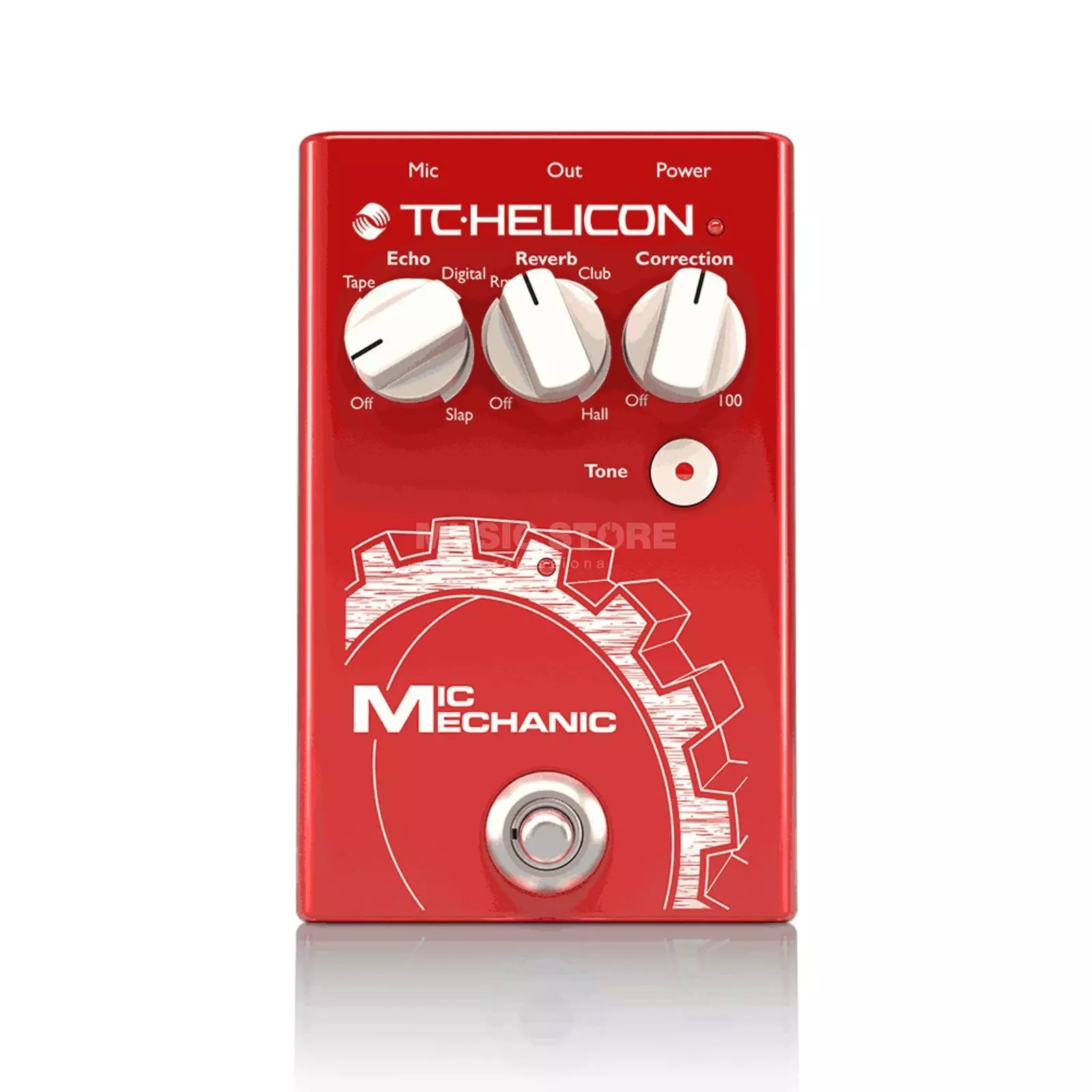
TC Helicon VoiceTone Mic Mechanic 2 Vocal Effects Pedal Review
The TC Helicon Mic Mechanic 2 is a compact vocal effects pedal built around four core tools: reverb, delay, pitch correction, and adaptive tone. It sits in your signal chain between your microphone and the mixing board, processing your vocal signal in real time.
For solo performers, singer-songwriters, and anyone running sound from the stage, the Mic Mechanic 2 answers a specific question: how do you get a polished vocal sound without a dedicated sound engineer or a rack full of outboard gear?
After testing this pedal extensively and collecting feedback from working musicians, here is what it actually does well, where it falls short, and who should consider buying one.
What the Mic Mechanic 2 Does Well
Reverb That Sounds Natural
The reverb is the standout feature on this pedal, and it is the reason most people buy it. The center knob controls three reverb styles — room, club, and hall — plus the amount of reverb applied to your signal.
At low to moderate settings, the reverb sounds clean and musical. A light room reverb adds presence without making your vocals sound processed. The club setting works for mid-size venues, and the hall reverb produces the kind of rich, spacious sound you would associate with a cathedral or concert hall.
Where the reverb struggles is at extreme settings. Crank it too high and the tails can get swimmy and pitch-shifted, which sounds unnatural. Keep it moderate and you will be happy with the results.
Delay and Echo
The left knob handles echo and delay. You can dial in everything from a rockabilly-style slapback to a longer, more atmospheric repeat. The control adjusts both the delay time and the amount of effect applied to your signal.
For live performance, even a subtle delay setting adds depth and fullness to a vocal that might otherwise sound thin through a basic PA. It can take a flat, mono vocal and give it a sense of space and dimension.
Adaptive Tone
The tone button under the control knobs is quietly one of the most useful features on the Mic Mechanic 2. When engaged, it analyzes your incoming vocal signal and automatically adjusts EQ, compression, de-essing, and gating in real time.
In practice, this means cleaner, more present vocals without manually tweaking four separate parameters. It is especially effective when you are plugging into an unfamiliar PA system or a powered speaker with limited onboard processing. The adaptive tone adds brightness and clarity that can make a noticeable difference in a live mix.
That said, the results depend heavily on the PA you are running through. On a well-tuned system with decent channel strips, the tone button may add more brightness than you want. On a basic powered speaker or a small mixer with no built-in effects, it can be a genuine lifesaver.
Where the Mic Mechanic 2 Falls Short
Pitch Correction Is the Weakest Link
The right knob controls chromatic pitch correction, and this is where the Mic Mechanic 2 disappoints. TC Helicon markets this feature prominently, but real-world results are inconsistent.
At subtle settings, the correction is too gentle to fix anything meaningful. Turn it up and the effect becomes audible and plastic-sounding — the kind of obvious auto-tune artifacts that most live performers want to avoid. Unlike studio pitch correction software that can analyze context, key, and scale, the Mic Mechanic 2 uses simple chromatic correction that pulls every note toward the nearest semitone regardless of musical context.
If you intentionally want a hard auto-tune effect for stylistic purposes, there are better tools for that. And if you want transparent correction that cleans up slight pitch issues without the audience noticing, the Mic Mechanic 2 is not reliable enough for that job either.
The bottom line: buy this pedal for its reverb, delay, and adaptive tone. Treat the pitch correction as a bonus feature, not a reason to purchase.
No Presets
Unlike competitors such as the Boss VE-1, the Mic Mechanic 2 has no preset memory. Every setting is controlled by the three physical knobs, which means you cannot switch between configurations mid-set without bending down and manually adjusting them.
For performers who use the same settings all night, this is not an issue. But if you want a dry, intimate sound for one song and a big reverb wash for the next, you will either need to mark your knob positions or accept some fumbling between songs.
No Volume or Gain Control
The Mic Mechanic 2 does not have a dedicated output volume or gain knob. The original Mic Mechanic had a side-mounted gain control, but TC Helicon dropped it in version 2 to make room for 9V battery operation.
This means your input gain staging matters. If your signal level is too low going into the pedal, the effects will not engage properly. If it is too hot, you may hit feedback issues faster than expected. Several working musicians have noted that getting the input level right is critical with this pedal.
Key Specs and Connectivity
The Mic Mechanic 2 uses XLR in and XLR out, so it drops directly into any standard mic-to-mixer signal chain. It also includes 48V phantom power pass-through, which means condenser microphones work without needing a separate power source or mixing board.
Power options include the included 12V DC adapter or a standard 9V battery — a significant upgrade over the original, which required the proprietary adapter. The 9V battery option means you can run it from a standard pedalboard power supply, which is convenient for guitarists who already have a powered board.
There is also a USB port for firmware updates, though some users have reported connectivity issues with the USB connection on certain computers.
Mic Control Compatibility
The Mic Mechanic 2 supports TC Helicon’s mic control feature, which lets you engage and disengage effects directly from a compatible microphone. This means you do not need to be standing next to the pedal to toggle effects on or off.
The catch is that only TC Helicon’s MP-75 and MP-76 microphones have built-in mic control. For other microphones, the TC Helicon MCA100 adapter plugs into the bottom of your mic and adds mic control functionality.
Who Should Buy the Mic Mechanic 2
The Mic Mechanic 2 makes the most sense for a specific type of performer:
- Solo acoustic musicians playing small to mid-size venues where there is no dedicated sound engineer
- Singers who run their own sound from the stage and need a simple, one-pedal solution for vocal polish
- Anyone with a basic PA that lacks built-in effects — the Mic Mechanic 2 adds reverb, delay, and compression that budget mixers typically do not include
- Performers who value simplicity — three knobs, one button, and a footswitch is about as straightforward as vocal processing gets
If you already have a quality mixing board with built-in effects and a sound engineer running it, the Mic Mechanic 2 probably will not improve your sound. Its effects rarely surpass what a mid-level digital mixer already offers.
Alternatives Worth Considering
If the Mic Mechanic 2 does not quite fit your needs, here are a few alternatives in the vocal effects pedal category:
Boss VE-1 Vocal Echo
The Boss VE-1 offers similar reverb and echo effects but adds preset memory, so you can save and recall different configurations with a footswitch. It also includes a vocal harmonizer function that the Mic Mechanic 2 lacks. If switching between settings mid-performance matters to you, the VE-1 is worth the step up. Check it out on Amazon.
TC Helicon VoiceTone H1
If you specifically need vocal harmony rather than reverb and delay, the VoiceTone H1 is a dedicated harmonizer pedal from the same TC Helicon lineup. It generates two- or three-part harmonies from your vocal input. It lacks the reverb, delay, and adaptive tone of the Mic Mechanic 2, so think of it as a different tool for a different job.
TC Helicon VoiceLive 3 Extreme
For performers who want the full vocal processing toolkit — harmony, effects, looping, guitar processing, and more — the VoiceLive 3 Extreme is TC Helicon’s flagship floor unit. It is substantially larger and more complex, but it can replace an entire rack of gear for a solo performer.
Final Verdict
The TC Helicon Mic Mechanic 2 is a solid, no-frills vocal pedal that excels at reverb, delay, and adaptive tone processing. It is not the pedal to buy for pitch correction, and the lack of presets limits its flexibility for performers who need different sounds throughout a set.
But for its intended use case — adding professional-sounding vocal effects to a simple live setup — it delivers. The compact form factor, 9V battery operation, XLR connectivity, and phantom power pass-through make it practical for gigging musicians who want better vocal sound without added complexity.
If you are a solo performer or singer looking for a straightforward way to improve your live vocal sound, the Mic Mechanic 2 on Amazon is worth a look. Pair it with a solid vocal mic and you have a complete front-of-house vocal chain that fits in a gig bag.